URL to Markdown vs DESIGN.MD: Extract Webpages for Design
Last updated: May 11, 2026.
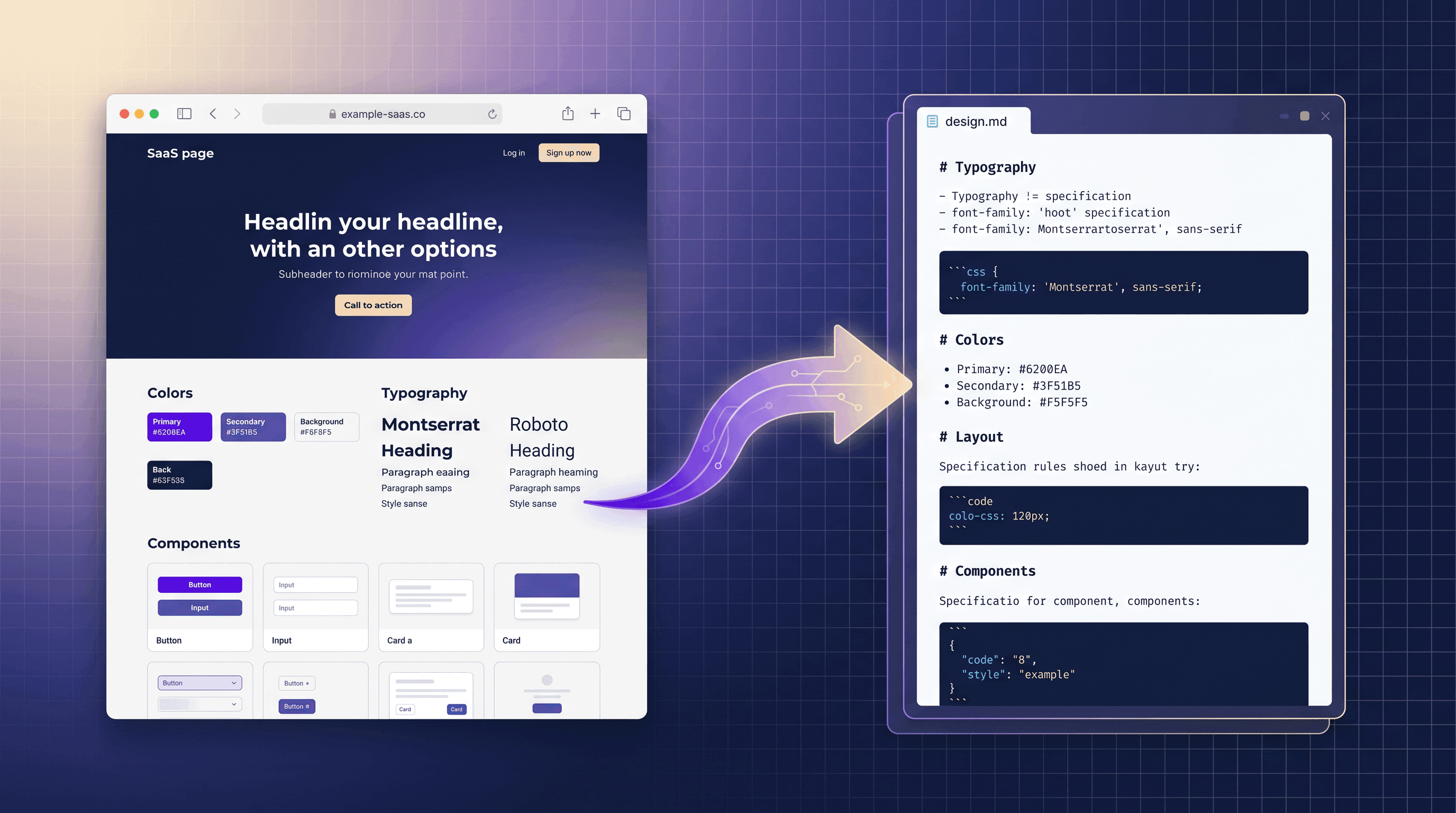
On May 11, 2026, DESIGN.MD by Parallect hit Product Hunt at rank #20 with a sharp pitch: paste any website URL, get back a design.md file describing that site's visual system — typography, color tokens, layout patterns, component inventory. The pitch lands because there's a real workflow behind it: drop the design.md into Cursor, Claude Code, or v0, and the AI agent now has a structured spec to reproduce or remix the design.
That raised an obvious question for everyone watching the launch: do I need a dedicated SaaS for this, or can I get the same design.md by stitching together URL to Markdown converters, screenshot tools, and an AI summarizer that I already use? If you already pay for content-extraction tooling, the answer turns out to be "mostly yes" — and the DIY flow gives you more control over what ends up in the spec.
This guide compares DESIGN.MD by Parallect against general-purpose URL to Markdown converter workflows, shows when each one wins, and walks through a 4-step DIY workflow to generate design.md from any URL using URL to Any.
Table of Contents
- What Is design.md (and Why It Suddenly Matters)
- What DESIGN.MD by Parallect Actually Does
- URL to Markdown Tools vs Dedicated design.md Generators
- Feature Comparison Table
- How to Choose: Dedicated design.md vs DIY URL to Markdown
- DIY: 4-Step Workflow to Generate design.md from Any URL
- FAQ
What Is design.md (and Why It Suddenly Matters)
design.md is a Markdown file that captures a website's design system in a single document — typography scale, color palette, spacing rules, layout grid, component patterns, and tone of voice — written in a structure an AI coding agent can consume. Think of it as a package.json for visual design: a single file your agent reads before it writes any UI code.
The pattern blew up in 2026 because every AI coding agent — Cursor, Claude Code, v0, Windsurf — works dramatically better when you hand it a structured spec instead of a screenshot. A design.md file gives the agent extractable, copy-pasteable rules:
- Typography: "Display: Inter 600, 56/64; H1: Inter 600, 40/48; Body: Inter 400, 16/26."
- Color tokens: "Primary #0F172A, Accent #6366F1, Surface #FFFFFF, Muted #F1F5F9."
- Layout: "12-column grid, 1200px max-width, 80/120/160 vertical rhythm."
- Components: "Cards use 12px radius, 1px hairline border, 24px internal padding."
With those rules in context, the agent stops inventing arbitrary numbers and starts replicating your reference site reliably. That's the entire reason a tool dedicated to producing design.md from a URL exists.
What DESIGN.MD by Parallect Actually Does
DESIGN.MD by Parallect is a hosted SaaS with one job: paste a URL, get back a polished design.md file. Under the hood it crawls the page, samples computed CSS, captures screenshots at multiple breakpoints, runs a vision model over the layout, and emits a Markdown document with the structured rules above. It launched on Product Hunt May 11, 2026 and trended at rank #20 the same day.
What it does well:
- Single-click output. No wiring needed — URL in,
design.mdout, 30–60 seconds. - Opinionated structure. The output matches the format the major AI agents already expect.
- Multi-breakpoint capture. It samples mobile, tablet, and desktop instead of one screenshot.
- Polished CSS extraction. It collapses dozens of computed font sizes into a clean scale.
Where it gets restrictive:
- Closed-source SaaS. You can't self-host, can't audit how it samples, can't change the output schema.
- One output format.
design.mdonly. If you also want raw Markdown of the page copy, an information-architecture outline, or a hero screenshot, you need another tool. - Per-URL pricing. Launch pricing puts it at ~$0.30–$1.00 per generation depending on plan. If you're extracting 50 competitor sites for a design audit, that's a real bill.
- No batch API at launch. One URL at a time through the web UI.
That last point — "one output format" — is where DIY URL to Markdown workflows start to look attractive. If you're going to crack open a competitor site anyway, you usually want more than just a style spec.
URL to Markdown Tools vs Dedicated design.md Generators
A URL to Markdown converter solves a wider problem than design.md does: extract a structured representation of any webpage so an LLM or human can work with it. The output isn't pre-shaped as a design spec — it's plain Markdown of the page content, plus optional companion extracts (headings, meta tags, screenshots, AI summary).
The trade-off:
- DESIGN.MD by Parallect is one-shot and opinionated. You give up flexibility for a polished, ready-to-feed-Cursor output.
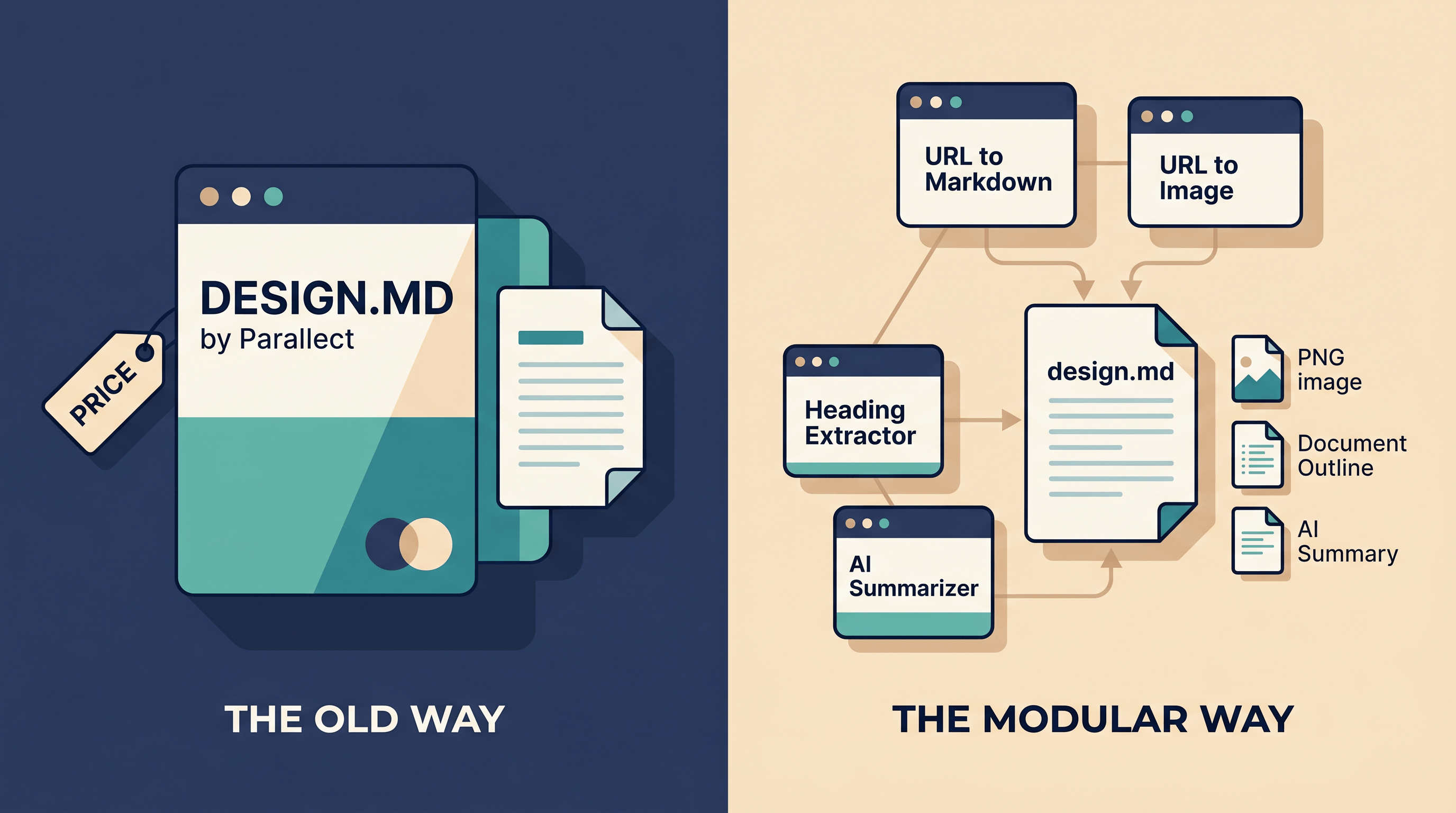
- URL to Markdown converters (like URL to Any) are flexible and composable. You assemble the spec from 3–4 small tools, and you keep every intermediate artifact (raw Markdown, screenshot, heading outline, summary) for other uses.
If you only need design.md and you only need it once, DESIGN.MD wins on convenience. If you need design.md plus the raw page copy, plus a screenshot for a slide deck, plus an outline for a competitive teardown — and you need to do it on 20 URLs — a URL to Markdown tool chain is faster and cheaper.
Feature Comparison Table
| Feature | DESIGN.MD by Parallect | URL to Any (DIY chain) | Generic URL→Markdown (Firecrawl, Jina Reader, r.jina.ai) |
|---|---|---|---|
| Primary output | design.md (design spec) | Markdown + screenshot + headings + AI summary | Raw Markdown of page content |
| Extract design tokens | Yes (typography, color, layout) | Partial — derive from CSS in Markdown + screenshot | No |
| URL → Markdown converter | No (CSS-focused) | Yes, native | Yes, native |
| Screenshot capture | Yes, multi-breakpoint | Yes (URL to Image) | No |
| Heading / IA outline | No | Yes (Heading Extractor) | Indirect (from Markdown headings) |
| AI-generated summary | No (raw spec only) | Yes (AI Summarizer) | No |
| Meta tags / SEO data | No | Yes (Meta Tags Extractor) | No |
| Output formats | design.md only | Markdown, JSON, XML, Text, PDF, Image, MP3 | Markdown only |
| API access | Limited / waitlist at launch | Web tools, no signup | Yes (Firecrawl, Jina) |
| Login required | Yes | No | Varies (Firecrawl: yes; r.jina.ai: no) |
| Open source | No | No (free hosted) | Firecrawl: partially; Jina Reader: hosted |
| Pricing (launch tier) | ~$0.30–$1.00 / URL | Free for typical use | Firecrawl: free tier + paid; Jina: free with rate limits |
| Best for | One-off design.md for AI agents | Building design.md plus other artifacts | Feeding raw page content into an LLM |
| Not ideal for | Bulk audits, mixed-output workflows | When you want a one-click spec | When you need design tokens specifically |
Best for / Not ideal for, summarized:
- DESIGN.MD by Parallect — Best for: a designer who needs one polished
design.mdand is happy paying per URL. Not ideal for: 20-site teardowns, embedded workflows, or anyone who also needs raw Markdown of the page. - URL to Any (DIY chain) — Best for: anyone running competitor audits, building Cursor/Claude Code context packs, or doing weekly research. Not ideal for: people who refuse to stitch 3–4 tools together.
- Generic URL→Markdown (Firecrawl, Jina Reader) — Best for: developers piping page content directly into an LLM via API. Not ideal for: producing a structured design spec without further prompt-engineering.
How to Choose: Dedicated design.md vs DIY URL to Markdown
Three decision points actually matter when picking between DESIGN.MD by Parallect and a URL to Markdown converter workflow:
- Volume. Generating
design.mdfor one hero competitor? Use Parallect. Auditing 20 SaaS landing pages this week? Use a free URL to Markdown chain. - Companion artifacts. Need only the design spec? Parallect. Also need raw page copy, hero screenshot for a slide, AI summary of positioning, meta tags? A URL to Markdown converter wins because it produces each output as a first-class file.
- Self-control. Need to tweak the schema (add a "voice and tone" section, drop the color palette)? DIY wins — you control the assembly. Parallect's output schema is fixed at launch.
A simple rule: if design.md is the only thing you'll ever need from this URL, pay for DESIGN.MD. If you'd open the same URL in 3 other tools anyway, build the design.md yourself from a URL to Markdown chain.
DIY: 4-Step Workflow to Generate design.md from Any URL
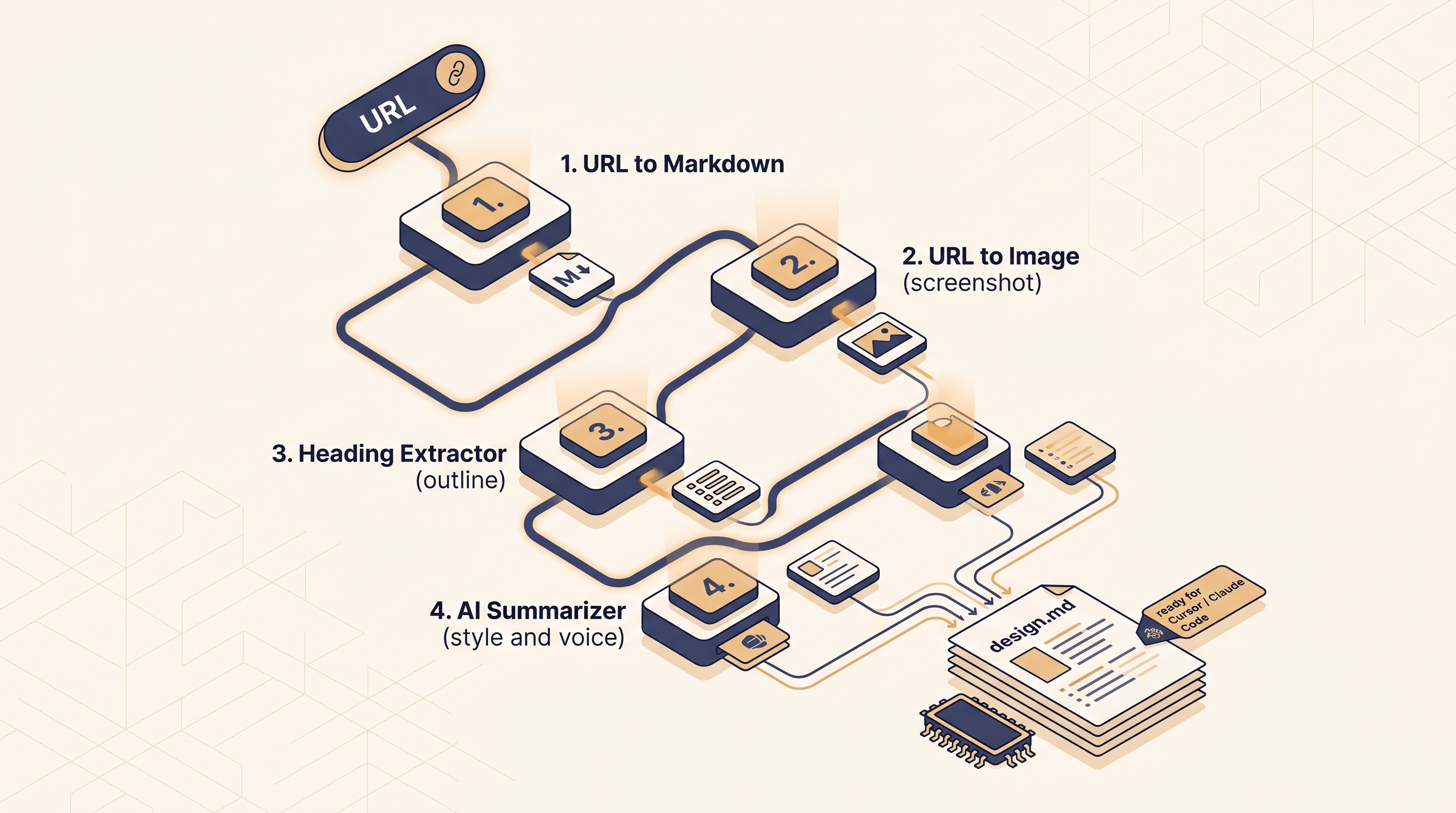
Here's the assembly we use in practice. Total time per URL: ~3–4 minutes. Cost: free. Output: a design.md you can paste into Cursor or Claude Code, plus three companion artifacts.
Step 1: URL → Markdown — Extract Page Copy and Structure
Paste the target URL into URL to Any's URL to Markdown converter and download the Markdown. This gives you the page's copy, headings, lists, links, and tables in a clean structured form. Conversion typically takes 2–3 seconds.
Why this matters for design.md: the Markdown captures the page's content hierarchy — what's a heading, what's a CTA, what's a feature card. Your final design.md references this hierarchy when describing layout patterns ("Hero section: H1 + subheading + primary CTA + secondary CTA").
Step 2: URL → Image — Capture the First-Screen Visual
Switch to URL to Image on the same site and capture the hero section at a standard breakpoint (1440px is a safe default). Save the PNG.
This screenshot is your visual ground truth. When you feed design.md into Cursor along with this PNG, the agent can cross-check the spec against the actual rendering. URLs alone aren't enough — most agents can't fetch live pages reliably; a static image plus a Markdown spec is the combo that works.
Step 3: Heading Extractor — Pull the Information Architecture
Run the same URL through URL to Any's Heading Extractor. You get a clean nested outline of every H1/H2/H3 on the page. This is the page's IA in 30 lines or fewer.
Drop this outline into design.md under an "Information Architecture" section. It's the part of the spec that tells the AI agent how content is sequenced on this kind of site — not the styling, but the structure of "Hero → Social Proof → Features → Pricing → FAQ → Footer."
Step 4: AI Summarizer — Distill Style and Tone
Finally, drop the URL into the AI Summarizer with a prompt like:
"Summarize this page's visual style, brand voice, and design patterns. Include: typography feel, color tone, layout style, and 3 phrases that capture the brand voice."
You get back a 200–300 word styled summary. Paste this as the "Style & Voice" header in design.md. This is the qualitative layer Parallect's output also includes — the part you can't extract from CSS alone.
Assemble design.md
Concatenate the four outputs into a single Markdown file:
# design.md — [Site Name]
## Style & Voice
[paste from Step 4]
## Information Architecture
[paste from Step 3]
## Content Patterns
[selected excerpts from Step 1 Markdown — hero copy, CTAs, feature card patterns]
## Visual Reference
 <!-- from Step 2 -->
## Tokens (manual pass)
- Typography: ...
- Color: ...
- Spacing: ...
The tokens section is the one part you fill in manually — open DevTools on the reference site, sample 3 colors and 3 font sizes, write them down. Two minutes of work. The rest of the file is auto-generated from the four URL to Any tools.
This assembled design.md does the same job as Parallect's output for any AI agent — and you keep the raw Markdown, the screenshot, and the outline as separate files for other uses (teardown docs, slide decks, RFP responses).
FAQ
Does URL to Markdown extract CSS or computed styles?
No. A URL to Markdown converter focuses on content structure — headings, paragraphs, lists, links. For computed CSS (font sizes, colors, spacing tokens), you still need to open DevTools on the source page, or use a dedicated tool like DESIGN.MD by Parallect that runs a headless browser to sample CSS. The DIY workflow above pairs URL to Markdown with a manual 2-minute DevTools pass to capture tokens.
Can I generate design.md from multiple URLs in batch?
With URL to Any, yes — paste each URL into the URL to Markdown converter sequentially; each conversion takes 2–3 seconds and there's no signup gate. DESIGN.MD by Parallect, at launch, runs one URL at a time through its web UI; a batch API is on its waitlist. If you're auditing 20+ sites, the DIY chain is much faster end-to-end.
Does URL to Markdown handle JavaScript-rendered pages?
Yes. URL to Any renders JavaScript before extracting Markdown, so React, Vue, and Next.js sites with client-side hydration come through correctly. Pages that gate content behind a login or aggressive bot protection (Cloudflare Turnstile) will only return the public shell — you'll need to capture those manually.
Is DESIGN.MD by Parallect open source?
No. At launch (May 11, 2026), DESIGN.MD by Parallect is a closed-source hosted SaaS with paid tiers. If open source is a hard requirement, look at Firecrawl (partial open source) or build the DIY chain in this guide, which doesn't depend on a single vendor.
Can I use the design.md output directly in Cursor or Claude Code?
Yes — that's the point of the format. Drop the design.md file into your project root (or a /specs folder) and reference it explicitly in your prompt: "Use the design tokens in design.md when implementing this component." Both Cursor and Claude Code load Markdown context efficiently, and a single design.md typically fits in a few thousand tokens.
What about Firecrawl, Jina Reader, or r.jina.ai?
These are also URL to Markdown tools, but they target a different audience. Firecrawl and Jina Reader optimize for developers piping raw page content into an LLM via API; their output is high-quality Markdown of the page text. They don't produce screenshots, heading outlines, or AI summaries as first-class outputs — so for assembling a design.md, URL to Any's bundled tool chain saves wiring steps. For pure server-side LLM pipelines, Firecrawl and Jina remain strong picks.
Conclusion
DESIGN.MD by Parallect's Product Hunt launch made one thing clear: the URL → structured design document workflow is real, and people will pay for it. But the workflow doesn't need a dedicated SaaS — a URL to Markdown converter paired with screenshot, heading-extraction, and AI-summary tools produces the same design.md in 3–4 minutes, free, with every intermediate artifact saved as a separate file.
Pick Parallect when you want one polished spec and don't want to assemble it yourself. Pick a URL to Markdown chain when you're auditing more than two URLs, when you also need raw content or screenshots, or when you want to tweak the output schema.
Want to build your own design.md from any URL in 4 minutes? Try URL to Any free → — 10+ tools on one site (URL to Markdown, URL to Image, Heading Extractor, AI Summarizer), no signup, no per-URL fee.