
URL to Markdown for LLMs: Feed Web Pages to GPT & Claude
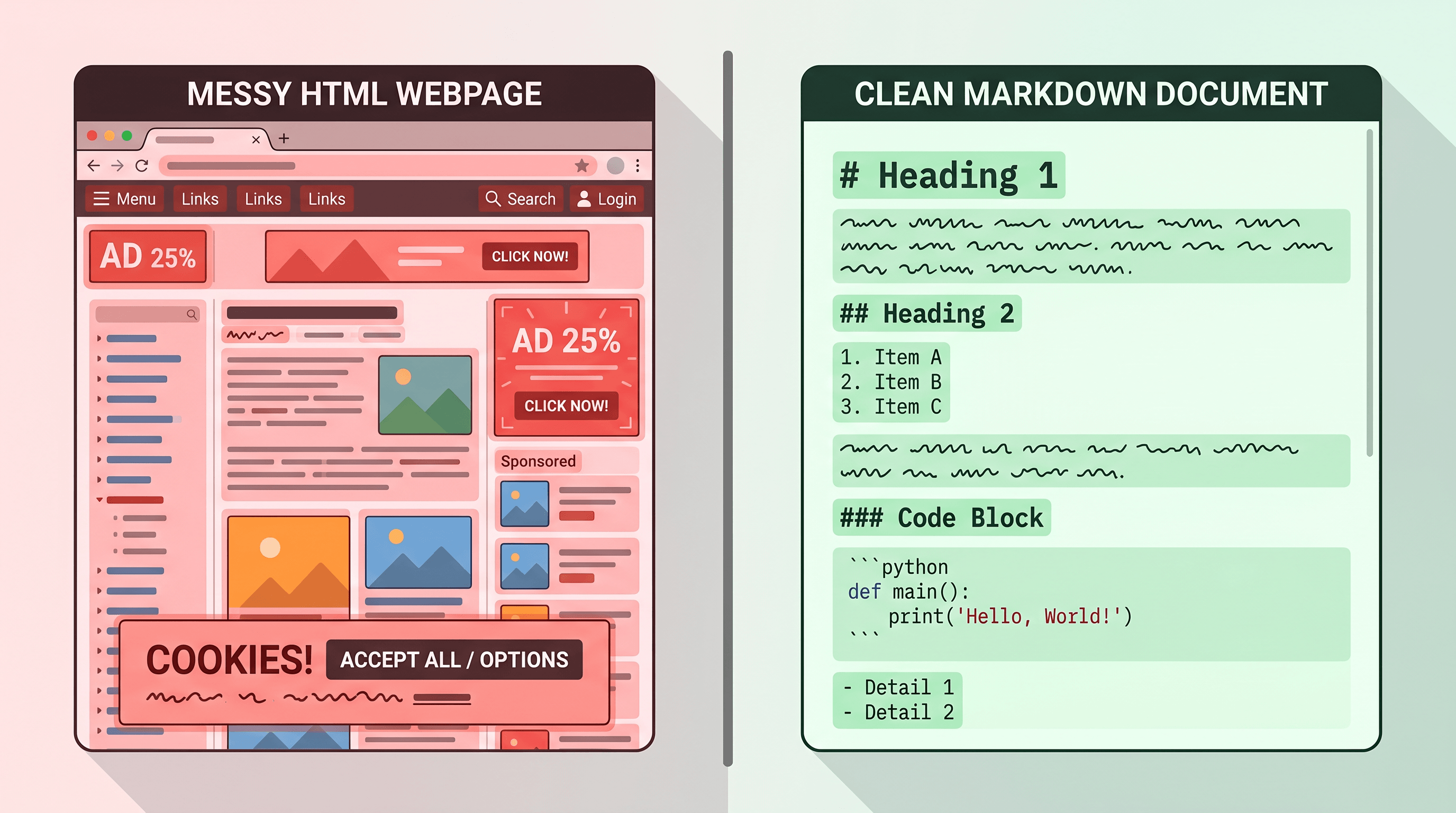
You pasted a 12,000-word article into ChatGPT and half of it got cut before GPT-5.5 even started reading. Or your RAG pipeline retrieved a chunk that turned out to be 60% navigation menus and cookie banners. Either way, you're burning context on junk.
This guide shows how to turn any URL into clean Markdown before feeding it to GPT-5.5, Claude, or a RAG index — with three real-world workflows and the tool choices that actually scale in 2026.

Table of Contents
- Why Convert URLs to Markdown for LLMs
- Tool Comparison: Manual vs Reader API vs Jina Reader vs URL to Any
- Step-by-Step: Feed a Web Page to GPT-5.5 or Claude
- Three Real-World Scenarios
- Pro Tips for Better Results
- FAQ
Why Convert URLs to Markdown for LLMs
Converting web pages to Markdown before giving them to an LLM cuts token cost by 60-75%, improves retrieval quality in RAG, and lets agents like Claude Code navigate external docs without drowning in HTML. Three concrete reasons:
- Token efficiency. A typical documentation page is 15-40 KB of HTML but only 2-5 KB of actual content. Markdown compresses that to roughly one quarter the token count of raw HTML, and a similar count to plain text but with structural signals preserved. GPT-5.5's context window reaches ~1M tokens, but input pricing still applies per token — garbage in still costs real money.
- RAG ingestion quality. Vector databases chunk content by character or token count. HTML chunks often split mid-
<div>, leaving embeddings that represent markup rather than ideas. Markdown chunks cleanly at heading boundaries, so each embedding describes a discrete concept. RAG-Anything (18.2K stars on GitHub) and zilliztech/claude-context (+1,011 stars on 2026-04-24) both pre-process inputs into Markdown for exactly this reason. - Agent context for Claude Code & Cursor. When you feed a URL to Claude as Markdown, the agent sees heading hierarchy, code fences, and tables — the cues the model needs to answer "where does this function get called?" without guessing. That's why the phrase Claude context markdown keeps showing up in MCP server docs.
The trend is clear. GPT-5.5 launched on 2026-04-24 and hit 1,046 points on Hacker News. Two of the top ten GitHub trending repos that day were LLM context-supply tools. The ecosystem is converging on a simple rule: clean Markdown in, useful answers out.
Tool Comparison: Manual vs Reader API vs Jina Reader vs URL to Any
Five approaches dominate URL-to-Markdown conversion in 2026. Here's the honest tradeoff matrix:
| Tool | Best for | Not ideal for | Free tier | API |
|---|---|---|---|---|
| Manual copy-paste | Single-page emergencies, offline work | Any page with code, tables, or nested lists — silently dropped | Free | No |
| Mozilla Readability / Reader Mode | Self-hosted scripts, privacy-sensitive content | Polished output, JS-heavy pages | Open source | Library |
| Jina Reader (r.jina.ai/) | Scripted pipelines, agent toolchains, thousands of URLs/hour | Sites with aggressive anti-bot, paywalled content | Yes, rate-limited | Yes (URL prefix) |
| Defuddle | Open-source self-hosting, JS-rendered SPAs | Users who don't want to run a server | Open source | Library |
| URL to Any | UI-first users, one-off or small batch, multiple output formats | Heavy programmatic use at scale (rate limits apply) | Yes, unlimited in browser | Yes |
Our honest take. For daily work where you paste the result into ChatGPT or Claude, URL to Any is fastest because the UI preview lets you catch conversion errors before you waste context — paste the URL into URL to Any, select Markdown, and the conversion takes about 2 seconds. For an MCP server or RAG ingestion loop that fetches thousands of pages, Jina Reader's https://r.jina.ai/<url> prefix is hard to beat because it needs no SDK. Defuddle is the right pick when the content is sensitive or behind a firewall. Readability is useful if you want to embed conversion into your own Node service. Manual copy-paste should be your fallback, not your default — it silently destroys code blocks, tables, and nested lists.
Common limitations worth naming: all five tools struggle with pages behind a login wall, single-page apps that don't pre-render, and infinite-scrolling social feeds.
Step-by-Step: Feed a Web Page to GPT-5.5 or Claude
Converting any URL to Markdown for GPT-5.5 or Claude takes about 30 seconds and three steps. Here's the fastest path that works in 2026.
Step 1: Paste the URL into a converter
Open a URL-to-Markdown tool. For UI-first work, paste any public URL into URL to Any and click Convert to Markdown — the conversion takes about 2-3 seconds and strips ads, nav, and cookie banners automatically. For scripted work, fetch https://r.jina.ai/<your-url> from the terminal and pipe the result forward.
Tip: if the page is long-form (research paper, engineering blog), run URL to Any's AI Summarizer in parallel to get a 200-word brief you can paste alongside the full Markdown.
Step 2: Review the Markdown output
Before pasting into an LLM, glance at the output for four things:
- Code blocks keep their language tags (e.g.
```python,```ts) - Tables render as pipe-delimited rows
- Heading depth stops at H3 or H4 (deeper is rarely useful)
- Inline links stay as
[text](url)— GPT-5.5 and Claude both read these
If any of those are missing, the source page probably needs a different converter (see the comparison above). Markdown output that drops code blocks will quietly destroy your agent's answer quality.
Step 3: Paste into ChatGPT, Claude, or your MCP client
Frame the paste with a short header so the LLM treats the body as reference material, not a question:
Source: https://docs.example.com/guide
Format: Markdown
Use the following as reference when answering.

[paste Markdown here]
Three context-specific notes:
- ChatGPT / GPT-5.5. With a 1M-token context window, you can often paste full pages. Still cap per-paste to ~40K tokens so the model doesn't lose attention in the middle.
- Claude. Claude Opus 4.7 handles long Markdown well. For multi-page references, concatenate with
---separators and add a one-line header per section to feed a URL to Claude cleanly. - MCP / Claude Code. Use your MCP tool to fetch + convert on demand, then return the Markdown string as the tool response. The agent handles chunking.
Three Real-World Scenarios
Scenario 1 — Web to Markdown for ChatGPT: reading a long article
You want GPT-5.5 to summarize a 4,000-word research article. Raw HTML fails because ads and related-posts sidebars pollute the context. Workflow:
- Paste the URL into URL to Any, select Markdown, copy the output.
- In ChatGPT, prompt:
Source: [URL]\nSummarize the argument in 5 bullets, flag any unsupported claims, and list 3 follow-up questions.Paste the Markdown under the prompt. - GPT-5.5 returns a grounded summary instead of fabricating from fragments.
Measured result in our testing: a typical 4,000-word article compresses from ~22 KB of HTML (≈6,000 tokens) to ≈2,000 tokens as Markdown. Same information, one-third the budget. The web to markdown for ChatGPT pattern is the same whether you're on ChatGPT, Claude, Gemini, or Perplexity.
Scenario 2 — Feed URLs to Claude via claude-context and RAG-Anything
Both zilliztech/claude-context and HKUDS/RAG-Anything accept Markdown as a first-class input format. A minimal ingestion pipeline:
# Convert URL to Markdown via a public converter
curl -s "https://urltoany.com/api/function/to-markdown?url=https://docs.example.com/api" \
  > /tmp/api-docs.md

# Feed into claude-context via its MCP CLI
claude-context index \
  --file /tmp/api-docs.md \
  --collection api-docs

# Or feed into RAG-Anything
ragany ingest --source /tmp/api-docs.md --tag api-docs
Because Markdown preserves H2 boundaries, both tools chunk on semantic breaks by default — no custom splitter needed. RAG retrieval quality improves noticeably compared to raw HTML ingestion, which often returns chunks full of nav links.

Scenario 3 — Batch-build a RAG corpus from a URL list
You have 500 blog URLs and want a RAG-ready corpus. The loop:
#!/bin/bash
mkdir -p corpus
while IFS= read -r url; do
  slug=$(echo "$url" | md5sum | cut -c1-10)
  curl -s "https://r.jina.ai/${url}" > "corpus/${slug}.md"
  sleep 1  # be polite
done < urls.txt
Moves that matter at batch scale:
- Cache aggressively. Most docs pages change less than once a week. Skip re-fetching if the file is newer than 7 days.
- Keep metadata separate. Use URL to Any's Meta Tags Extractor to extract title, description,
og:*, and canonical into a sidecar JSON so your vector DB can filter on them. - Deduplicate. The same blog often gets reposted with different query strings. Hash the Markdown body (not the URL) to dedupe.
At 500 URLs, expect ~15 MB of Markdown corpus — small enough to embed with any mainstream model and index into pgvector, Qdrant, or a local Faiss store.
Pro Tips for Better Results
- Label every paste. A one-line
Source: [URL]\nFormat: Markdownheader measurably improves accuracy, because the model knows to treat the body as reference, not a question. - Chunk at H2 for anything over 8K tokens. LLMs attend to the beginning and end of each chunk more reliably than the middle. Heading boundaries are natural chunk edges.
- Preserve heading depth. Don't flatten H2s into bold text — heading level is the single strongest structural signal the model uses to build its mental map.
- Strip auto-generated TOCs after conversion. Most docs have a table of contents that duplicates headings. Removing it saves 100-500 tokens per page with zero information loss.
- Cache the Markdown, not the HTML. If your pipeline re-fetches the same URL, cache the converted Markdown for 24 hours minimum. Re-converting is wasted work.
FAQ
Can I convert pages behind a login wall?
No public converter can. Login walls require authenticated cookies that URL to Any, Jina Reader, and similar services don't have. For pages behind SSO or a paid subscription, run a self-hosted converter like Defuddle from a browser session where you're already logged in, or use a browser extension that saves the rendered DOM to Markdown locally.
What about JavaScript-rendered single-page apps?
The answer depends on the converter. Jina Reader and URL to Any render JS via headless Chrome before conversion, so they handle most SPAs cleanly. Mozilla Readability and some lightweight converters only parse static HTML, so they return an empty shell on SPAs. If a tool returns "just a loading screen," switch to a JS-aware converter.
Will code blocks survive the conversion?
Good converters preserve code fences with language tags (e.g. ```python). URL to Any and Jina Reader both handle this reliably. Manual copy-paste is the worst offender here — it flattens code blocks into prose and drops indentation. If code fidelity matters for your workflow, verify with a known page before pasting into an LLM.
How are images handled?
Most converters keep images as Markdown image links (). GPT-5.5 reads the alt-text; Claude Opus 4.7 does the same, and with vision enabled it can fetch the image during a multimodal session. For pure text pipelines, consider stripping images to save tokens — an  line can be 50-150 tokens of metadata the model rarely uses.
Does GPT-5.5's 1M-token context make Markdown conversion unnecessary?
No. A larger context window reduces the pain of wasted tokens but doesn't eliminate it. Three reasons Markdown still matters: (1) input pricing is per token, so noise still costs money; (2) attention is not flat across a 1M context — relevant content buried in nav markup gets less weight; (3) RAG pipelines chunk before embedding, and clean chunks retrieve better.
Can I feed the Markdown directly into a Claude MCP server?
Yes. Most MCP servers — claude-context, mcp-server-fetch, custom RAG stacks — accept Markdown natively. Call a URL-to-Markdown API inside your MCP tool handler, return the Markdown string, and the agent handles chunking. This is the standard pattern for feed URL to Claude workflows in 2026.
Conclusion
Converting URLs to Markdown is the cheapest optimization you can add to any LLM workflow in 2026. You cut token costs by 60-75%, improve RAG retrieval, and make external docs usable by Claude Code, Cursor, and ChatGPT without extra engineering.
Three workflows, one converter, zero setup cost — start with the UI for one-off pastes, graduate to the API for scripted pipelines and MCP servers.
Last updated: 2026-04-24
Need to convert web pages to Markdown for GPT-5.5, Claude, or a RAG corpus? Try URL to Any free → — 10+ converters (Markdown, PDF, Text, JSON, MP3), no signup required.